Collaborative Diagramming Tools for Systems Architecture
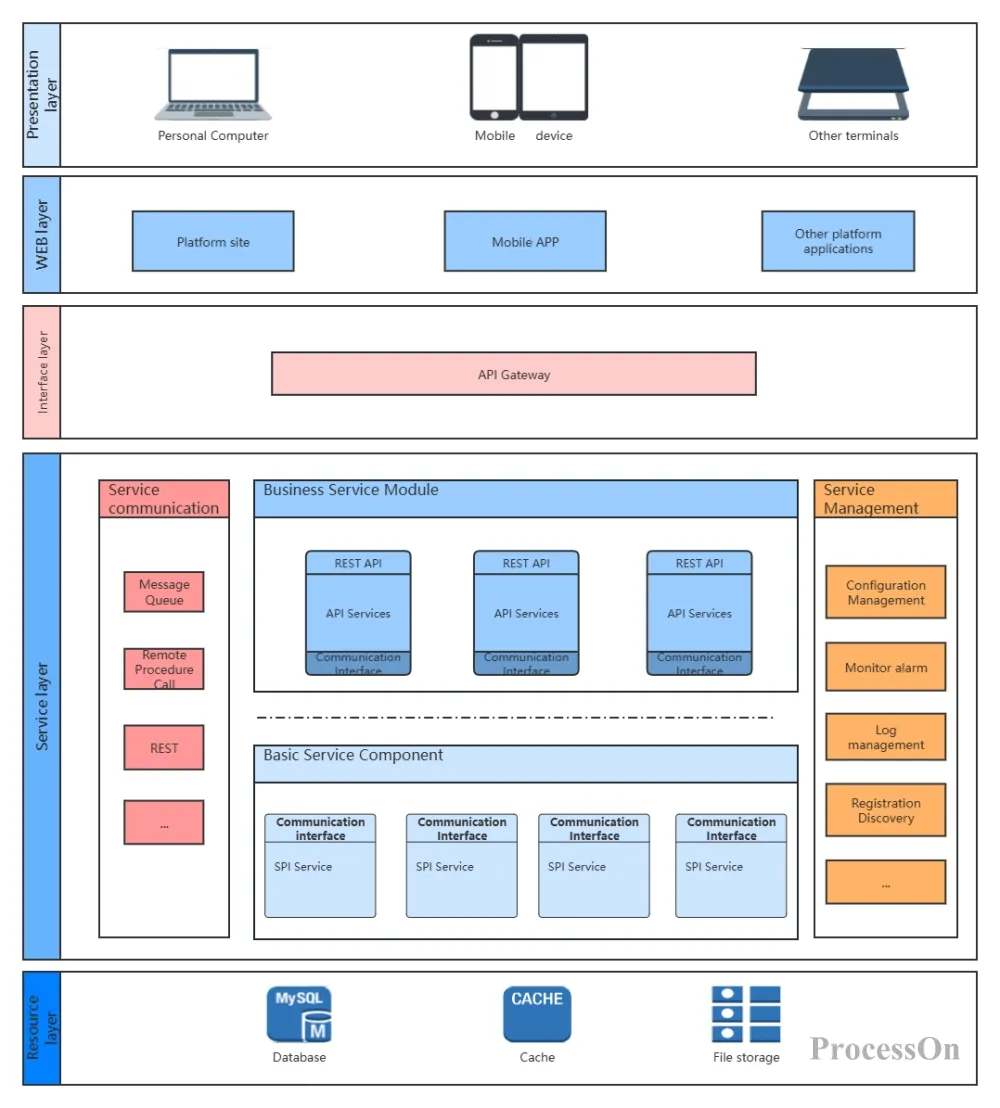
Let’s be honest — systems architecture is messy. You’ve got microservices, databases, APIs, queues, and maybe a legacy monolith lurking in the corner. And you’re supposed to keep it all straight? That’s where collaborative diagramming tools come in. Not just any diagramming, though — we’re talking real-time, team-friendly, “let’s fix this before it breaks” kind of tools.
I’ve been through the wringer with whiteboards that get erased, Visio files that get lost in email threads, and Google Drawings that feel like pulling teeth. So when I say collaborative diagramming tools are a game-changer, I mean it. They’re not just for drawing boxes and arrows — they’re for aligning your team’s brain on complex systems. And honestly? That’s half the battle.
Why Bother with Collaborative Diagramming?
Well, imagine trying to explain a Kafka event stream to a junior dev over Slack. You type, they squint, and suddenly you’re both confused. A diagram — a shared one — cuts through that noise. It’s like a map for your architecture. And when everyone can edit it at the same time, you catch edge cases early. You know, the kind that wake you up at 3 AM.
Here’s the deal: static diagrams are dead. They rot. A collaborative tool keeps things alive — version history, comments, even live updates when your CI/CD pipeline changes. That’s not just nice; it’s survival.
Top Tools for Systems Architecture Collaboration
Alright, let’s get into the meat. I’ve tested a bunch, and these are the ones that actually work for real teams — not just for pretty pictures.
1. Miro — The Whiteboard on Steroids
Miro is probably the most popular right now, and for good reason. It’s infinite canvas, sticky notes, and real-time cursors. Your team can throw up AWS icons, draw flows, and argue about caching strategies — all in one place. It’s like a digital war room.
But here’s the kicker: Miro’s templates for C4 models and AWS architectures are solid. You don’t start from scratch. And the commenting? It’s threaded, so you can actually have a conversation without losing context. Sure, it can get laggy with huge diagrams, but for most systems, it’s a win.
2. Lucidchart — The Professional’s Pick
Lucidchart feels more… structured. It’s less freeform than Miro, more like a diagramming tool that grew up. You can create UML diagrams, network topologies, or even data flow diagrams with precision. And it integrates with Jira, Confluence, and Slack — so your architecture lives where your team works.
One thing I love: the auto-layout feature. You know when you’ve got a spaghetti mess of arrows? Lucidchart can untangle it for you. It’s not perfect, but it’s close. The collaboration is smooth — multiple people can edit, and changes sync instantly. Just watch out for the pricing; it can sneak up on you.
3. Draw.io (diagrams.net) — The Free Workhorse
Honestly, Draw.io is the unsung hero. It’s free, open-source, and integrates with Google Drive, GitHub, and Confluence. The interface is a bit clunky — like, 2010-era clunky — but it’s powerful. You can export to SVG, PNG, or even embed in Markdown files. Perfect for devs who want to version-control their diagrams.
The collaboration isn’t as real-time as Miro or Lucidchart. You’ll need to save and share links. But for small teams or open-source projects? It’s a no-brainer. And it doesn’t nag you to upgrade every five minutes.
4. Excalidraw — The Minimalist’s Dream
Excalidraw is weirdly charming. It looks hand-drawn — rough lines, wobbly shapes — which actually makes it feel less intimidating. Perfect for early brainstorming when you don’t want to commit to perfect boxes. It’s collaborative, real-time, and end-to-end encrypted. Plus, it’s free.
The downside? It’s minimal. No UML templates, no AWS stencils. You’re drawing from scratch. But for quick sketches of system flows or event streams? It’s gold. I’ve used it to explain a circuit breaker pattern to a product manager, and they actually got it.
How to Choose the Right Tool for Your Team
So, which one do you pick? It depends — I know, that’s a cop-out answer. But let me break it down.
- If you need freeform brainstorming → Miro or Excalidraw. Miro for scale, Excalidraw for simplicity.
- If you need formal architecture diagrams → Lucidchart or Draw.io. Lucidchart for polish, Draw.io for cost.
- If you’re a DevOps-heavy team → Look for tools that integrate with Terraform or Kubernetes. Some tools like Terrastruct (not on the list but worth a mention) specialize in infrastructure diagrams.
- If you’re remote-first → Real-time collaboration is non-negotiable. Miro and Lucidchart win here.
And hey — don’t be afraid to mix tools. I’ve seen teams use Excalidraw for early sketches, then migrate to Lucidchart for final docs. That’s fine. The goal is clarity, not tool loyalty.
Best Practices for Collaborative Architecture Diagrams
Tools are only half the story. You need a process, too. Here are a few things I’ve learned the hard way:
Keep It Simple — Seriously
I’ve seen diagrams with 50 boxes and 100 arrows. They’re useless. Focus on one layer at a time — context, containers, components, code. The C4 model is your friend. A good diagram should fit on a single screen (or a single printout). If you’re scrolling, you’re overcomplicating.
Use Consistent Notation
Stick to a standard — AWS icons, UML, or your own legend. Inconsistent shapes confuse everyone. I once had a team use circles for databases and squares for services. It was chaos. Pick a style and document it.
Version Control Your Diagrams
This is huge. If your diagram lives in a tool’s cloud, you’re at their mercy. Export to SVG or PNG and check it into your repo. Or use a tool like Draw.io that saves to GitHub. That way, your architecture evolves with your code. No more “oh, that diagram is from last year.”
Make It a Living Document
Schedule a recurring review — every sprint, every month, whatever. Have someone own the diagram. If it gets stale, it’s dead weight. Collaborative tools make updates easy, so take advantage of that. Add comments, tag people, and treat it like a conversation.
Current Trends in Collaborative Diagramming
The space is evolving fast. Here’s what I’m seeing:
- AI-assisted diagramming — Some tools (like Lucidchart) are adding AI to generate diagrams from text prompts. Imagine typing “Kafka producer to consumer with error handling” and getting a draft. It’s not perfect yet, but it’s coming.
- Live integration with infrastructure — Tools like Cloudcraft (for AWS) can pull your actual cloud resources and auto-generate diagrams. That’s huge for keeping things accurate.
- Real-time multiplayer — It’s the norm now. Even Draw.io is adding better collaboration features. Expect more cursor syncing and presence indicators.
- Embeddable diagrams — More teams are embedding diagrams directly in documentation (like Notion or Confluence). That’s where tools with good export options shine.
Pulling It All Together
Look, collaborative diagramming isn’t about the tool — it’s about the clarity it brings. When your team can see the same architecture, in real time, and argue about it without losing their minds, you’ve already won half the battle. The other half? Actually building it.
So pick a tool — Miro, Lucidchart, Draw.io, Excalidraw, whatever fits — and start drawing. Don’t overthink it. A rough diagram today is better than a perfect one next week. And remember: the best architecture diagrams are the ones that get used, not the ones that look pretty.
Now go untangle that spaghetti. You’ve got this.